


Miracle-Ear
4.6517.00 Reviews
App Specs
- Version
- 5.2.10(4)
- Updated On
- License
- Free
- Downloads
- 50,000+
- Developer
- Miracle-Ear
- Categories
- Medical
- Platform
- Android
Screenshots

 Analysis by AppCompare
What matters most to me in a hearing companion is not a long menu of controls; it is whether I can make a small, useful adjustment without interrupting the moment I’m in. That is the lens I’d use to judge Miracle-Ear: it is a free medical app from Miracle-Ear, designed to help people manage compatible hearing aids through a phone. Its appeal is practical rather than flashy. When a room changes, having a way to adjust your listening setup from the device you already carry can make everyday transitions feel less awkward.
What phone-based control changes
A hearing aid is something you wear through many different situations, while the sound around you can shift from quiet to busy in minutes. The central idea behind an app like this is to put useful controls within reach, instead of making every adjustment a trip to a clinic or a search for a separate control. In my view, that convenience is most valuable when it helps you respond calmly to a particular setting, not when it promises to solve every hearing challenge automatically.
That distinction matters. A phone interface can make a hearing routine easier to manage, but it does not replace hearing care or guarantee that every voice will be clear in every room. I would treat it as a companion to compatible Miracle-Ear hearing aids, not as a standalone hearing test, treatment, or substitute for professional advice. If you are choosing hearing aids for the first time, the app alone is not enough to decide which device or fitting is right for you.
A realistic day with the app
Picture arriving at a café after spending the morning at home. The background noise is suddenly different, and you want to check your listening setup without drawing attention to your hearing aids. A phone-based control can make that moment easier: you can look at the available settings, choose an option that suits the situation, and return your attention to the conversation. The useful part is not a promise of perfect speech in a noisy room; it is having a discreet way to manage your setup when the environment changes.
I’d also make a simple habit of checking your preferred settings before leaving home, especially if you’re still learning which choices feel comfortable. That gives you a familiar starting point rather than leaving you to experiment while someone is talking. If an adjustment makes a conversation less comfortable, returning to the setting you already know is often more sensible than repeatedly changing several controls at once.
How it compares with the usual alternatives
Without an app, a person may rely on controls on the hearing aids themselves, a separate accessory, or a visit with a hearing care professional when they need help fine-tuning things. A phone companion can be more convenient for everyday changes because the interface is nearby and easier to inspect. The trade-off is that you need a compatible setup and a charged, accessible phone; a phone control is not automatically better than a physical control for someone who prefers fewer screens or finds small menus frustrating.
It is also worth separating day-to-day control from clinical care. An app can help you manage the experience of using hearing aids, but a hearing care professional remains the better choice for persistent discomfort, a change in hearing, or adjustments that do not seem to solve the problem. I would not keep turning settings up to compensate for a concern that deserves proper attention.
Worth Reading Before You Choose

EA SPORTS FC Mobile 26 Is a Bigger Football Game, but It Takes Time

Flipboard Shows What News Apps Must Do Beyond the Feed

Switching to Android Auto Means Rethinking Your Driving Routine

Google Calendar Makes a Crowded Week Easier to Manage

Ludo King Makes the Most of the Minutes Between Plans

Baby Panda World Brings Quick Play to Modern Phones, but Its Game Library Feels Busy
Who is likely to benefit most
I can see this being useful for someone who already wears compatible Miracle-Ear hearing aids and wants a convenient way to manage them during ordinary routines. It may suit a person who moves between home, work, errands, and social settings and prefers to have controls on a familiar phone. It is less compelling if you do not use Miracle-Ear hearing aids, want a general hearing-screening tool, or mainly need advice about whether hearing aids are appropriate for you.
Before relying on it, I would check that your hearing aids and phone work with the app and take a few minutes to learn the controls in a quiet place. That small bit of preparation can help avoid fumbling in a busy setting. The app is free, rated for Everyone, and its current version is 5.2.7(6); it was released on July 7, 2025, and requires Android 9 or later. It has an average rating of 4.6 from around 4,500 ratings, with more than 50,000 installs and around 435 written reviews. Those figures suggest there is an established audience, but they cannot tell you whether the controls will suit your own hearing needs.
So, I recently got my hands on the Miracle-Ear app, and let me tell you, it's been quite the journey exploring all its bells and whistles. If you're curious about improving your hearing experience, this app might just be your new best friend. Let's dive into what makes this app tick and why it might be worth a spot on your phone.
Getting Started with Miracle-Ear
First things first, downloading the Miracle-Ear app is as straightforward as it gets. Available for both Android and iOS, you'll easily find it in your respective app store. Once downloaded, the setup process is a breeze. It guides you through pairing your Miracle-Ear hearing aids with your smartphone, ensuring everything is synced up perfectly.
One thing I loved right off the bat is the app's user-friendly interface. Even if you're not super tech-savvy, navigating through the menus is intuitive. The clean design and straightforward instructions make it easy to adjust settings and personalize your hearing experience.
Features That Stand Out
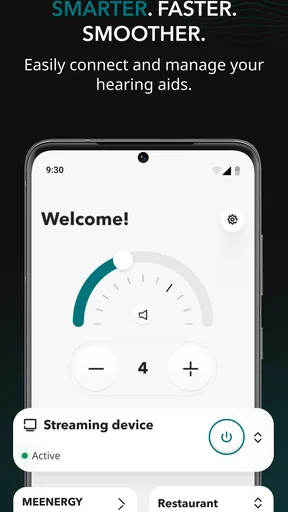
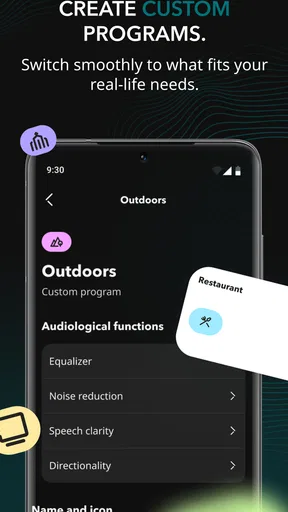
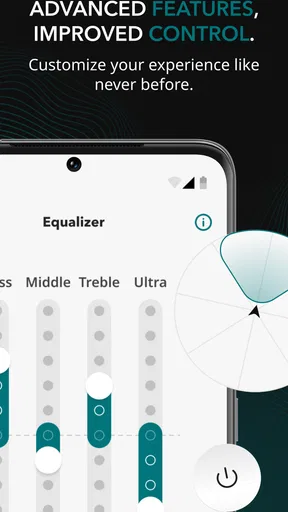
Now, let's talk features. The app is packed with useful tools that cater to various hearing needs. You can adjust volume levels, change programs, and even customize the sound settings to fit different environments. Whether you're in a crowded restaurant or enjoying a quiet evening at home, the app allows you to tailor your hearing experience seamlessly.
Another nifty feature is the "Find My Hearing Aid" tool. I mean, how many times have you misplaced something only to spend hours searching? This feature uses your phone's GPS to locate your hearing aids, saving you the hassle and frustration.
One of my personal favorites is the battery status indicator. It gives you real-time updates on your hearing aids' battery life, so there's no second-guessing when it's time to charge them. Trust me, this little detail can be a lifesaver.
Personalized Experience
What truly sets the Miracle-Ear app apart is its focus on personalization. The app stores your preferred settings, so you don't have to manually adjust everything every time you use it. It remembers your favorite programs and volume levels, making the whole experience feel tailored just for you.
Moreover, the app offers a "SoundDiary" feature, where you can note down your experiences in different environments. Over time, this helps in identifying patterns and making necessary adjustments, ensuring you get the best possible hearing experience.
Seamless Connectivity
If you're someone who loves streaming music or watching videos, the Miracle-Ear app has you covered. It offers seamless connectivity to your smartphone, allowing you to stream audio directly to your hearing aids. This feature is a game-changer for anyone who wants to enjoy media without missing a beat.
Plus, the app supports Bluetooth connectivity, which means you can take calls directly through your hearing aids. No more struggling to hear conversations in noisy environments—everything is crystal clear.
Support and Accessibility
One of the aspects I truly appreciate about the Miracle-Ear app is the support it provides. There's a "Help" section within the app that offers troubleshooting tips and guides. If you're ever stuck or need assistance, you can quickly find answers without having to leave the app.
Additionally, the app offers remote adjustments. This means you can connect with a hearing care professional who can help fine-tune your settings remotely. This feature is especially useful for those who might have difficulty visiting a clinic in person.
The app also emphasizes accessibility, ensuring that features are easy to use for everyone. From adjustable font sizes to voice commands, the app caters to a wide range of users, making it inclusive and user-friendly.
Final Thoughts
All in all, the Miracle-Ear app is a fantastic companion for anyone using Miracle-Ear hearing aids. Its blend of user-friendly design, personalized settings, and innovative features make it a standout choice in the realm of hearing aid apps. Whether you're tech-savvy or a newbie, the app is designed to enhance your hearing experience effortlessly.
If you're on the fence about giving it a try, I'd say go for it. The convenience and customization it offers are well worth the download. Plus, with its continuous updates and improvements, you can expect even more exciting features in the future. Happy hearing!
Pros
- User-friendly interface for easy navigation.
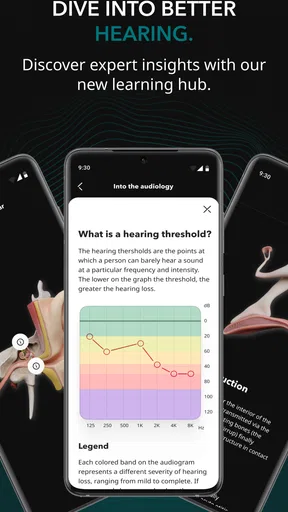
- Comprehensive hearing test features.
- Customizable sound settings for users.
- Supports integration with various devices.
- Provides regular updates and improvements.
Cons
- Limited functionality without a subscription.
- Requires internet for optimal performance.
- Setup can be complex for non-tech users.
- Customer support response times vary.
- Battery life can be a concern with continuous use.
FAQs for Miracle-Ear
What features does the Miracle-Ear app offer?
The Miracle-Ear app offers a range of features such as personalized hearing profiles, volume control, and environment-specific settings. Users can easily adjust their hearing aids directly from their smartphones. The app also includes a battery status indicator and a helpful troubleshooting guide, ensuring users have a seamless experience.
Is the Miracle-Ear app compatible with all hearing aids?
The Miracle-Ear app is specifically designed to work with Miracle-Ear hearing aids. It may not be compatible with other brands. Users should check the compatibility list on the app's download page or consult with their hearing care professional to ensure their model is supported before downloading.
How user-friendly is the Miracle-Ear app for older individuals?
The Miracle-Ear app is designed with user-friendliness in mind, offering an intuitive interface with large icons and simple navigation. It includes easy-to-follow instructions and video tutorials to assist users, making it accessible for older individuals who may not be tech-savvy.
Does the Miracle-Ear app offer any support or customer service?
Yes, the Miracle-Ear app provides access to customer support directly through the app. Users can chat with support representatives, find answers to common questions in the FAQ section, or locate nearby Miracle-Ear centers for in-person assistance. This ensures users have comprehensive support whenever needed.
Is there a cost associated with using the Miracle-Ear app?
The Miracle-Ear app itself is free to download and use. However, some features may require specific models of hearing aids, which could involve additional costs. Users should consult with their Miracle-Ear provider to understand any potential expenses related to their specific hearing aid model.


